Remote work brought a lot of advantages for both employees and businesses. It gave people more flexibility and allowed companies to hire talent from different locations. But of course, these benefits also came with major changes. And one of the biggest changes took place in enterprise networking. In simpler terms, the remote work environment we have today has significantly changed how companies connect employees, devices, applications, and systems.
In this article, we will take a deeper look at how these changes have taken place. We will discuss how remote work has changed enterprise networking, considering the modern technologies companies now rely on to keep employees securely connected from anywhere in the world. We will also look at the security concerns and challenges that come with remote access, as well as the cloud-based solutions and modern access control systems that businesses now depend on. Let’s dive right in!
Enterprise Networking Before Remote Work Expansion
First, what is enterprise Networking? Enterprise networking refers to the systems, technologies, and infrastructure that businesses use to connect their employees, devices, applications, and data so that work can be performed efficiently and securely.
Now what does enterprise networking look like before remote work? That is, under the traditional work system.
For one, things were much simpler under the traditional work system. Most employees worked inside the office, used company-managed devices, and connected directly to internal business networks. And since everyone works within the same physical environment, the network infrastructure that they used was more centralized, easier to manage, and built mainly around office-based operations.
The Shift Toward Remote and Hybrid Work
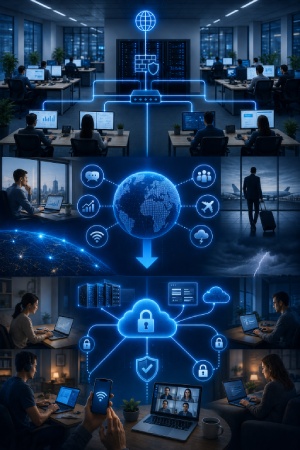
Over time, certain factors, situations, and technological advancements began to make remote work and remote connectivity more necessary and possible for businesses. And so, it became a possibility, and then later a necessity for companies. Some of the major factors that encouraged this shift towards remote work include:
- Advancement in digital communication tools.
- Expansion of business to a global scale.
- Increased internet accessibility.
- Demand for more flexible work arrangements.
- Business travel and mobile work needs.
- Natural disasters and emergency situations.
One specific situation, which was perhaps the most significant turning point, was the COVID-19 pandemic. The lockdown and movement restrictions during this period forced millions of employees around the world to remain in their homes. But, despite these restrictions, businesses still needed to operate, communicate, and serve customers. As a result, many enterprises rapidly adopted remote work models as the most feasible alternative.
New Networking Demands Created by Remote Work
Now, a lot of businesses that adopted the remote work model, whether before, during, or after the Covid-19 pandemic, began to realize that their traditional networking systems, which were originally designed mainly for office environments, do not cut it when it comes to remote work. And so, there was now a need for network systems that support remote work better. In other words, businesses were in need of a proper remote network or remote access infrastructure.
Remote Access Infrastructure
Remote access infrastructure simply refers to the technologies, systems, and tools that allow employees to connect to company networks, applications, files, and internal systems from remote locations. In other words, it is the foundation that makes remote work possible for businesses.
Some of the most commonly used technologies include:
- Virtual Private Networks (VPNs).
- Remote Desktop Protocols (RDP).
- Virtual Desktop Infrastructure (VDI).
- Cloud-based remote access systems.
Virtual Private Networks (VPNs)
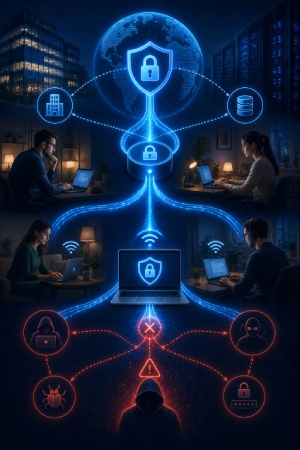
Virtual Private Networks (VPNs) were one of the earliest and most widely used remote access solutions for businesses. A VPN allows employees to securely connect to a company’s internal network over the internet. It works by creating an encrypted connection between the employee’s device and the company’s network, which helps to protect sensitive data from outside threats.
Now, although VPNs work well in allowing employees to safely access company files, applications, and systems from home, they also come with certain limitations. And some of their major limitations:
- Slower performance: VPN connections can sometimes slow down internet speed, especially when large numbers of employees are connected at the same time.
- Scalability issues: Many traditional VPN systems were originally built to support only a limited number of remote users. And so, there are always issues when businesses try to expand.
- Increased network congestion: When too many employees connect through the same VPN servers simultaneously, networks can become congested. This can lead to unstable connections and reduced overall performance.
- Security issues: Although VPNs improve security through encryption, they are not completely risk-free. Weak passwords, stolen credentials, or poorly secured devices can still expose company networks to cyber threats.
- Increased latency: VPN connections may introduce delays when employees access applications or systems located far from the central company server. This latency can become especially frustrating during video meetings or real-time collaboration.
Because of these limitations, many enterprises gradually began exploring alternative networking solutions that offered better scalability, stronger security, improved performance, and more flexibility for remote and hybrid work environments.
Remote Desktop Protocols (RDP)
Remote Desktop Protocols (RDPs) emerged as another technology that organizations used to support remote work. It allows employees to remotely control and access a work computer from another device. So instead of transferring company files directly to a personal device, the employee simply connects to their office computer through the internet and operates it remotely.
However, while RDP offers convenience and flexibility, businesses also have to secure these connections properly. This is because poorly protected remote desktop systems can become targets for cyberattacks.
Virtual Desktop Infrastructure (VDI)
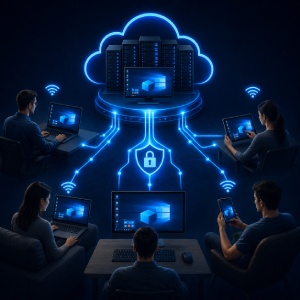
Virtual Desktop Infrastructure, commonly known as VDI, is a system that allows businesses to host virtual desktop environments on centralized servers. Employees can then access these virtual desktops remotely from different devices, including laptops, tablets, or even smartphones.
With VDI, the actual computing and data processing happen on the company’s servers rather than on the employee’s personal device. It also makes device management easier for IT teams, since updates, security controls, and software installations can be managed centrally.
However, implementing VDI systems can sometimes be expensive and may require strong network performance to work efficiently.
Cloud-Based Remote Access Systems
Cloud-based remote access systems became much more popular as businesses shifted toward cloud computing. Instead of relying entirely on office servers and physical infrastructure, companies began storing applications, files, and services in the cloud. This allowed employees to access work resources directly through the internet from virtually anywhere.
Now, cloud-based systems are easier to scale, more flexible, and simpler to manage compared to traditional office-centered networking systems. They also reduce the need for employees to connect through complex internal office networks before accessing company resources.
The Rise of Cloud-Delivered Networking
Cloud-based remote access systems are actually just one part of a much larger approach known as cloud-delivered networking.
As remote work continued expanding, businesses gradually realized that remote work involved much more than simply giving employees access to files and applications. It now affected the entire network of business operations. This included things such as employee connectivity, security, application delivery, network performance, user management, and access to company resources from different locations.
The cloud proved to be a much more practical and scalable way to achieve these goals. As a result, organizations increasingly began adopting cloud-delivered networking. Businesses started delivering more of their networking, security, and connectivity services through cloud-based platforms. This made it easier to support remote and hybrid workforces while also improving flexibility, scalability, and overall network management.
Two of the major technologies and operational models behind this shift include:
- Cloud computing: Simply put, businesses began storing data, applications, and services on cloud platforms instead of relying entirely on physical office servers.
- SaaS applications: Software-as-a-Service (SaaS) applications became much more common in remote work environments. Instead of installing software directly on office computers, employees could now access it directly through the internet.
Benefits of Cloud-Delivered Networking
Here are four major benefits that encouraged the adoption of cloud-delivered networking:
- Scalability and faster connectivity: As businesses grow or hire more remote employees, cloud-delivered networking makes it much easier to expand network resources and support additional users. Employees can also access work applications and systems from virtually anywhere with an internet connection.
- Better performance: Because applications and services can be accessed directly through the cloud, employees often experience faster and more reliable connections. This reduces the delays that can occur when all network traffic has to pass through a central office network.
- Reduced costs and simplified management: Businesses can reduce their reliance on expensive physical servers and networking equipment. At the same time, IT teams can manage security, software updates, and network performance more easily through centralized cloud platforms.
- Improved collaboration and operational resilience: Cloud-delivered networking allows employees to work together more effectively regardless of their location. It also helps businesses remain operational during unexpected disruptions, such as natural disasters, power outages, or office closures, because critical systems and services remain accessible through the cloud.
Access Control in Modern Enterprises
With cloud-delivered networking, access to company resources became faster and more seamless. However, this convenience also brought new concerns. As more employees began accessing business systems from different locations and devices, organizations needed a way to ensure that only the right people could access sensitive resources. This created a growing need for stronger access control systems.
Below are some of the major access control approaches that modern enterprises now use to protect their networks and resources.
Zero Trust Architecture
Zero Trust Architecture operates on the principle of “never trust, always verify.” Under this approach, every user, device, and application must be authenticated before gaining access to company resources, regardless of whether they are inside or outside the organization’s network.
Identity-Based Security
Since employees can now connect from different locations, devices, and networks, enterprises need a way to ensure that the person attempting to access company resources is actually who they claim to be. As a result, organizations began adopting identity-based security models that verify the identity of users before granting access. For example, they now use multi-factor authentication (MFA), which requires users to provide additional verification beyond a password, such as a code sent to their phone or email.
Biometric Authentication
This is also a form of identity-based security. This requires users to verify their identity through fingerprints, facial recognition, or other unique biological characteristics.
Least Privilege Access
Least privilege access means giving users only the permissions they need to perform their jobs and nothing more. For example, an employee in the finance department may have access to financial records but not to sensitive engineering data.
Conditional Access Policies
Conditional access policies allow organizations to make access decisions based on specific conditions. For example, a company may allow an employee to access a business application from a company-issued laptop but require additional verification if the same employee tries to log in from an unfamiliar device or location.
Secure Connectivity in the Remote Work Era
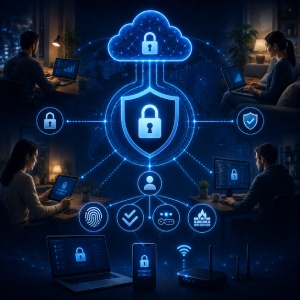
Security is another area that became more complex with the transition to remote work. Since connections now come from different locations, devices, and internet connections, there are new security risks.
Some of the major security challenges that enterprises now face include:
- Unauthorized access: With employees connecting from multiple locations and devices, businesses must ensure that only approved users can access company resources.
- Data breaches: Sensitive business information can be exposed if unauthorized individuals gain access to company systems or if employees accidentally share confidential data.
- Endpoint vulnerabilities: An endpoint refers to any device that connects to a company network, such as a laptop, smartphone, or tablet. If one of these devices becomes infected with malware or is not properly secured, it can create a pathway for attackers to enter the organization’s systems.
And so, businesses had to find ways to ensure and enhance security. That is, ensure that sensitive data and systems remain protected, while keeping employees connected. To do this, they use several security technologies, including:
Encryption
This helps protect data by converting it into a coded format that can only be read by authorized users. Even if data is intercepted during transmission, it remains unreadable without the proper decryption key.
Multi-Factor Authentication (MFA)
MFA strengthens account protection by asking users to confirm their identity through more than a single verification method.
Endpoint Detection and Response (EDR)
This involves continuously monitoring devices for suspicious activity. If a threat is detected, the system can alert security teams and help contain the attack before it spreads.
Identity and Access Management (IAM)
This has to do with controlling who can access specific resources and what actions they are permitted to perform. This ensures that users only have access to the information necessary for their roles.
Managing a Distributed Workforce
Another challenge that emerged alongside remote work was managing a workforce that was no longer located in a single office. The challenges that came with this reality are:
- Device Management: Employees may use laptops, smartphones, tablets, and other devices from different locations. However, ensuring that all these devices remain updated, secure, and compliant with company policies can be difficult.
- Remote Troubleshooting: In a traditional office environment, IT personnel can often resolve technical problems by physically accessing an employee’s device. With remote work, support teams must diagnose and fix issues from a distance.
- Maintaining Performance: Organizations must also maintain consistent network performance for employees working under different internet conditions. Some employees may have fast and reliable internet connections, while others may experience slower speeds or connectivity issues that affect productivity.
To address these challenges, organizations rely on a variety of management tools, including:
Mobile Device Management (MDM)
These systems help IT teams monitor, configure, and secure employee devices remotely. This allows organizations to enforce security policies and deploy updates without needing physical access to devices.
Cloud Collaboration Platforms
Platforms such as document-sharing, messaging, and video conferencing tools allow employees to communicate and work together regardless of location. These platforms have become essential for maintaining productivity in remote and hybrid work environments.
Centralized Monitoring Systems
These systems provide IT teams with visibility into network performance, device health, and system activity across the organization. This helps businesses identify and resolve issues before they significantly impact operations.
Remote IT Support Tools
Remote support tools allow technicians to access employee devices remotely, making it possible to troubleshoot problems, install software, and provide technical assistance without requiring employees to visit an office.
Where Enterprise Networking Goes Next
Remote work has undoubtedly brought significant benefits to both employees and businesses. However, it has also required major changes to the traditional enterprise networking systems to support employees working from different locations, devices, and networks. And of course, while these changes introduced many advantages, they also created new challenges related to security, access control, device management, and network performance. As a result, organizations had to adopt new solutions, including cloud-delivered networking, identity-based security, Zero Trust architectures, and remote workforce management technologies.
Ultimately, the evolution of enterprise networking has been driven by the need to balance flexibility, accessibility, and productivity with security and operational control. And as remote and hybrid work continue to evolve, these technologies will remain essential in helping businesses support a modern, distributed workforce.